

The Flexi server starts automatically when the system boots. If for some reason it fails to start, you are given the option to start it when you attempt to log in.

Windows
Navigate to the directory where Flexi is installed. The default location is C:\Program Files\Winstrom\. In that directory, you will find a subdirectory called service, which contains the file start.bat — run this file. If the problem persists, continue with the steps below.
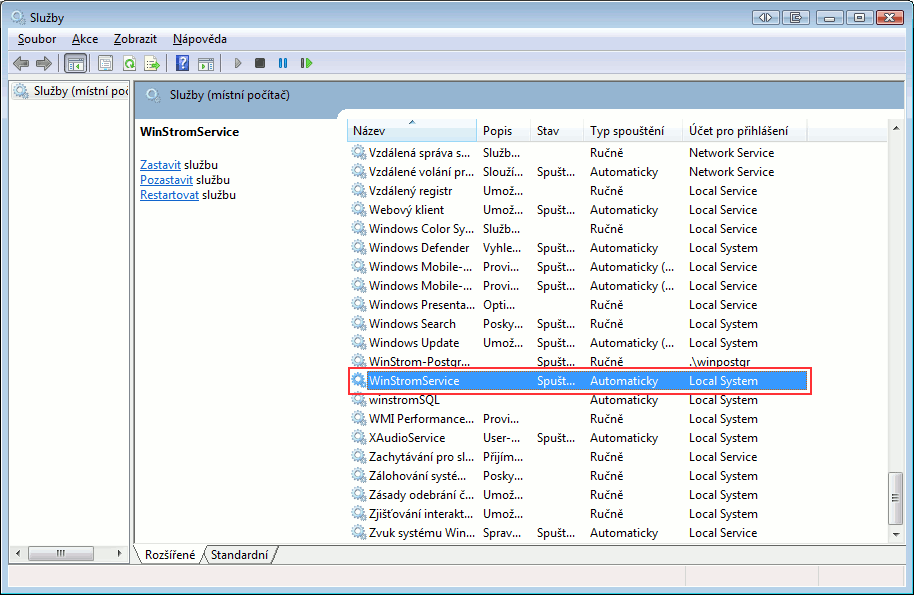
First, make sure that the Flexi server is indeed not running. From the Start menu, select Control Panel, then click the Administrative Tools icon. If you do not see this icon, switch the Control Panel to Classic View using the sidebar. Then select Services from the menu that appears.
A dialog will appear. In the Name column, locate the service named WinStromService. Check the Status column to verify whether it is running. Do the same for the WinStrom-PostgreSQL service. If either service is not running, restart the WinStromService service, which will automatically start the WinStrom-PostgreSQL service as well.
The cause may also be a mismatched port between the data source settings in the application and the port specified in the Flexi-server.xml file. (The file is located in C:\Program Files\Common Files\WinStrom or C:\Program Files (x86)\Common Files\WinStrom)
In the output, look for the postgres process running under the winstrom_postgresql user. If it appears in the output, the database server is running.
Mac OS X
You can verify whether the server is running by entering the following command:
ps aux | grep Flexi
If lines belonging to the winstrom user containing Java and PostgreSQL are returned, the servers are running.
Open a command prompt (terminal) and enter the following command:
sudo /bin/launchctl load -w /Library/LaunchDaemons/eu.flexibee.server.plist
If the command returns an error, it should be sufficient to start the server using the following command:
launchctl start eu.flexibee.postgresql
Linux
Open a command prompt (terminal) and enter the following line:
sudo /etc/init.d/flexi start
You can verify whether the database server is running by entering the following command:
sudo /etc/init.d/flexi status
If the server is running, the output will be as follows:
Flexi Server is running